Avada Plugins
Last Update: November 9, 2026
Avada comes with various plugins that can be very useful to your site. Some of these plugins are also required to fully install certain Avada Prebuilts.
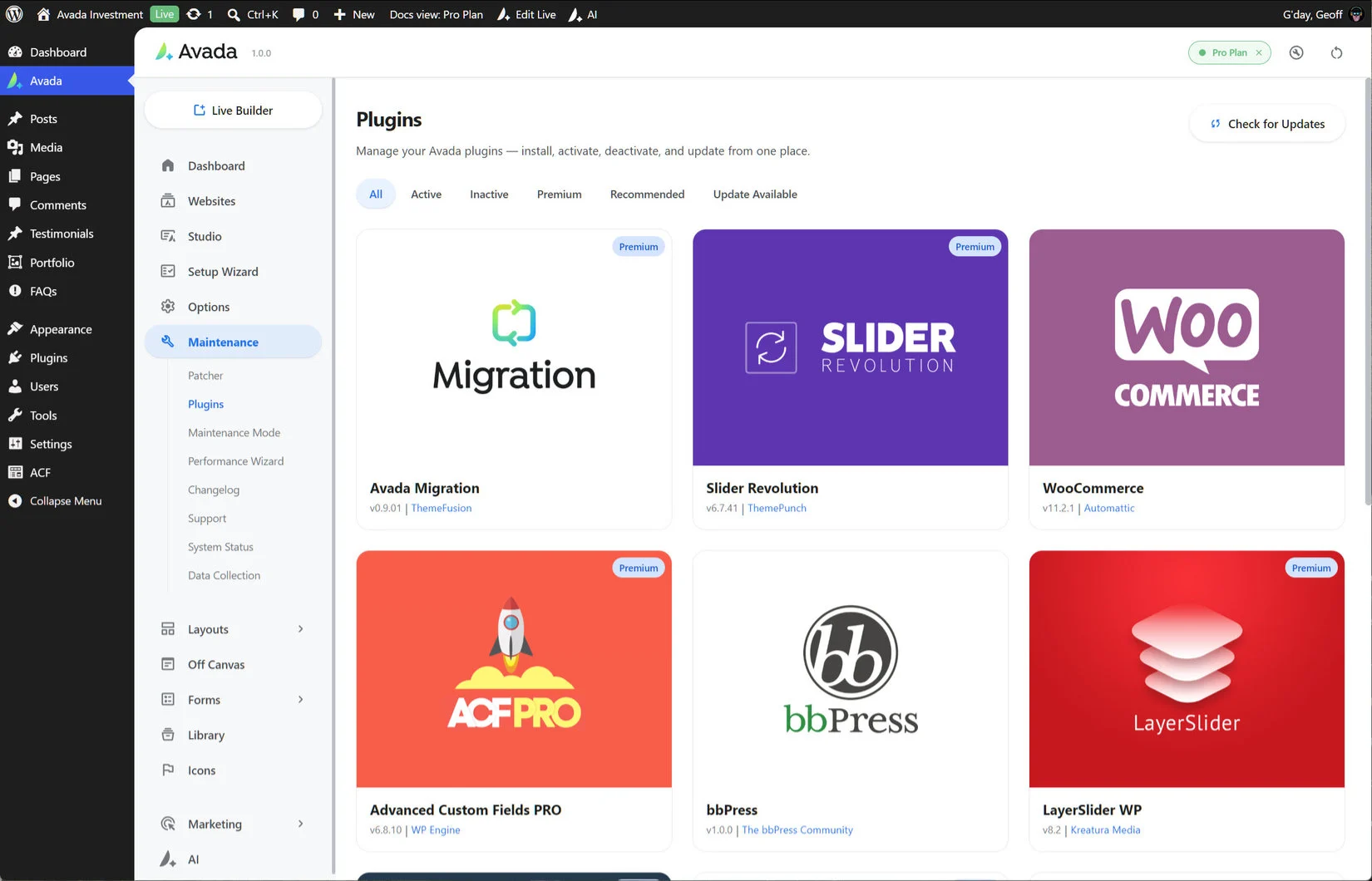
On the Maintenance > Plugins page, from the Avada Dashboard, you will be able to manage any of your Avada plugins — you can install, activate, deactivate, and update from one place. Across the top you will see a filter, that allows you to filter to the various states and types of plugins, such as Active, Inactive, Premium, Recommended, and Update Available. You can also check for Updates to refresh the list. Depending on whether you have any Avada Classic licenses, you will see a different screen.
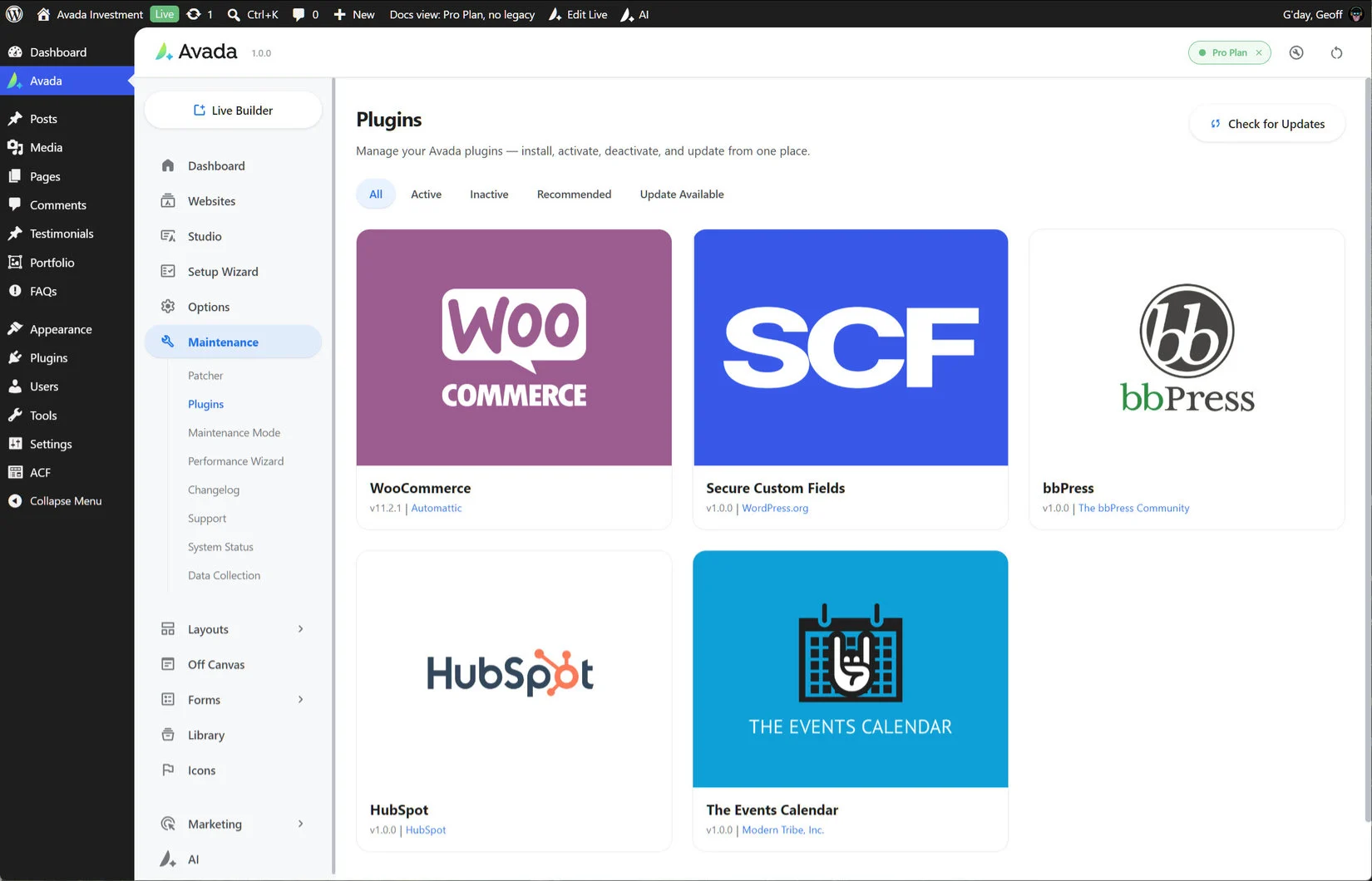
Recommended Plugins
These are free plugins that we include inside Avada purely for convenience. Just mouse over one to click Install. If a plugin in installed and active, you will instead see a deactivate link on rollover. To delete a plugin entirely, ensure it is deactivated and you can then delete it from the WordPress > Plugins page.
SCF
You will only see this on your Plugins list if you do not have a legacy license on your My Avada account. Secure Custom Fields (SCF) is a capable replacement for ACF Pro. It extends WordPress’s capabilities, transforming it into a flexible content management tool. With SCF, managing custom data becomes straightforward and efficient. The SCF builder makes it easy to add fields to WordPress edit screens, whether you’re adding a new “ingredients” field to a recipe or designing complex metadata for a specialized site.

WooCommerce
WooCommerce is one of the world’s leading eCommerce solution, and is owned by Automattic, the creators of WordPress. With almost 80 million downloads, WooCommerce is the most popular eCommerce platform on the web. There is deep design integration with Avada with this plugin, and it’s the perfect solution if you have something to sell.
For more information on how to integrate WooCommerce with Avada, please see the WooCommerce docs.

bbPress
Are you looking for a timeless, elegant, and streamlined discussion board? bbPress is easy to integrate, easy to use, and is built to scale with your growing community.
bbPress is intentionally simple, yet infinitely powerful forum software, built by contributors to WordPress. With bbPress, you can quickly set up a place for discussion, subscriptions, and more!

HubSpot
HubSpot is a powerful inbound marketing and sales cloud-based software suite, and their free plugin help connects your HubSpot account to your website. Their tools and service offerings help companies and individuals attract visitors, convert leads, control their marketing efforts, manage their sales processes, and much more.

The Events Calendar
The Events Calendar plugin is one of the world’s most popular events plugins, and is created and developed by Modern Tribe. It has a huge range of features and full design integration with Avada. For events, you can’t go past it.
For more information on how to set up The Events Calendar with Avada, please see the linked documentation.

Premium Plugins

Current version 1.0.0
If however, there is an Avada Classic license attached to your Avada account, you will still have access to the bundled, premium plugins that come with Avada Classic. They are completely optional but very useful and they are required for the full import of several of the prebuilt websites. They are Slider Revolution, Advanced Custom Fields PRO, LayerSlider WP, Convert Plus, and FileBird Pro. These premium plugins do not require additional licensing to use.
Slider Revolution
Slider Revolution is a popular, premium slider plugin developed by ThemePunch. It is a beautifully animated, 100% mobile responsive slider with a wide range of features and options.

Current version 6.8.1
Advanced Custom Fields PRO
Advanced Custom Fields Pro is a premium plugin originally developed by Elliot Condon, and now owned by WP Engine. The plugin lets you add extra custom fields, including repeatable blocks, intuitive galleries, custom settings pages, and reusable fields, to build websites faster.
If you don’t have a legacy license connected to your account, Secure Custom Fields (SCF) will be offered instead.

Current version 6.8.11
LayerSlider
LayerSlider is a premium and popular slider plugin developed by Kreatura. It is a slider for creating mind-blowing slideshows, engaging image galleries with effects, and animated landing pages.

Current version 8.4.1
Convert Plus
Convert Plus is a premium plugin developed by Brainstorm Force. It is an all-in-one pop-up plugin that helps you generate more leads and acquire more email subscribers. The Avada Off Canvas Builder is built into Avada One and allows you to do pretty muc all the same things.

Current version 3.6.4
FileBird Pro
FileBird Pro is a premium WordPress media library folders & file manager tool developed by NinjaTeam. It will make managing your media simple & save you time.

Current version 3.16.4
Plugins Update Process
Bundled Premium Plugins
If you have an Avada Classic license on your My Avada account, there are a number of Premium plugins that are included for your use. Your purchase of Avada, however, does not give you an individual license for the individual premium plugins. This means that you cannot update these plugins via the WordPress > Plugins page when an update is released.
Whenever a new version of one of the bundled Premium plugins is released, shortly after, we provide the plugin update via the Avada > Plugins page. To update the premium plugins, simply go to Avada > Plugins, and click the ‘Update’ button. Before updating premium plugins, please always make sure Avada is on the latest available version.
Recommended Plugins
The recommended plugins are free plugins, which we bundle with the theme for convenience. To upsate these plugins, simply head to the WordPress > Plugin page and when an update is available, you can update the plugin from there. When one of these plugins is added as part of a prebuilt website import, the latest version of the plugin will be used.
Plugin Installation Issues
If for any reason you’re unable to update / download plugins which are provided by Avada, there is an alternative method for getting the plugin files directly. Just log in to My Avada and head to the Downloads page, found under Avada Classic > Downloads. Here you can download all the premium plugins, so you can install them via ftp.
If you have any trouble with the above steps, please create a support ticket and one of our support members will assist you further.
Troubleshooting
1.) I Can’t Install The Bundled Premium Plugins
If the ‘Install’ button on the required and bundled Premium plugins (Avada Custom Branding, Slider Revolution, LayerSlider WP, Advanced Custom Fields PRO, Avada Custom Branding, and Convert Plus) is grayed out, this is because you have to activate your purchase first. Once you’ve registered your purchase successfully, you’ll be able to install and activate these plugins.
2.) The Site Crashes When I Activate The Plugins
This may be due to your server’s PHP configuration limits and will require that these configurations limits be increased. For most, these limits can be increased without having to contact your hosting provider. However, in rare cases some hosts can restrict manual intervention and that will require you to contact your hosting provider to increase the limits for you. Here is a detailed help file explaining how to update the PHP configuration limits.
3.) Unable To Update The Plugins
When you update a plugin, it fails, and you see this message onscreen:
“Plugin installation failed. The update procedure could not delete the plugin due to a permissions issue on your server. Please ask your hosting provider to check the permissions level or manually remove the plugin via FTP before attempting to reinstall it.”
This indicates a server folder permissions issue as the removal of old plugin should be automatic on update. Deleting of plugins on a server can be blocked for certain user levels as permissions will be different on each host. Please check here the Permission Scheme for WordPress or contact your hosting provider to fix the permission issue. You can also manually remove the plugin folder under /wp-content/plugins directory via FTP, and then, reinstall the plugin via the Avada > Plugins section.
4.) Fallback Method for Plugins
If Product Registration continues to fail and you can’t install the premium plugins, an alternative is to go to your My Avada account Dashboard, then navigate to the Avada Classic > Downloads tab. You will see buttons to download the Slider Revolution, LayerSlider WP, Advanced Custom Fields PRO, Avada Custom Branding, and Convert Plus plugins along with other resources.
5.) Fallback Method For Prebuilt Sites
For an alternative method to download and install the Avada Prebuilt Websites, please see our Alternate Prebuilt Website Import Method help file.