Global Options – Layout
Last Update: November 4, 2026
Layout is the first tab in the Global Options, and allow you to control the overall site layout and site width, as well as several other layout related options. To learn more about these various options, keep reading below.
Layout Options
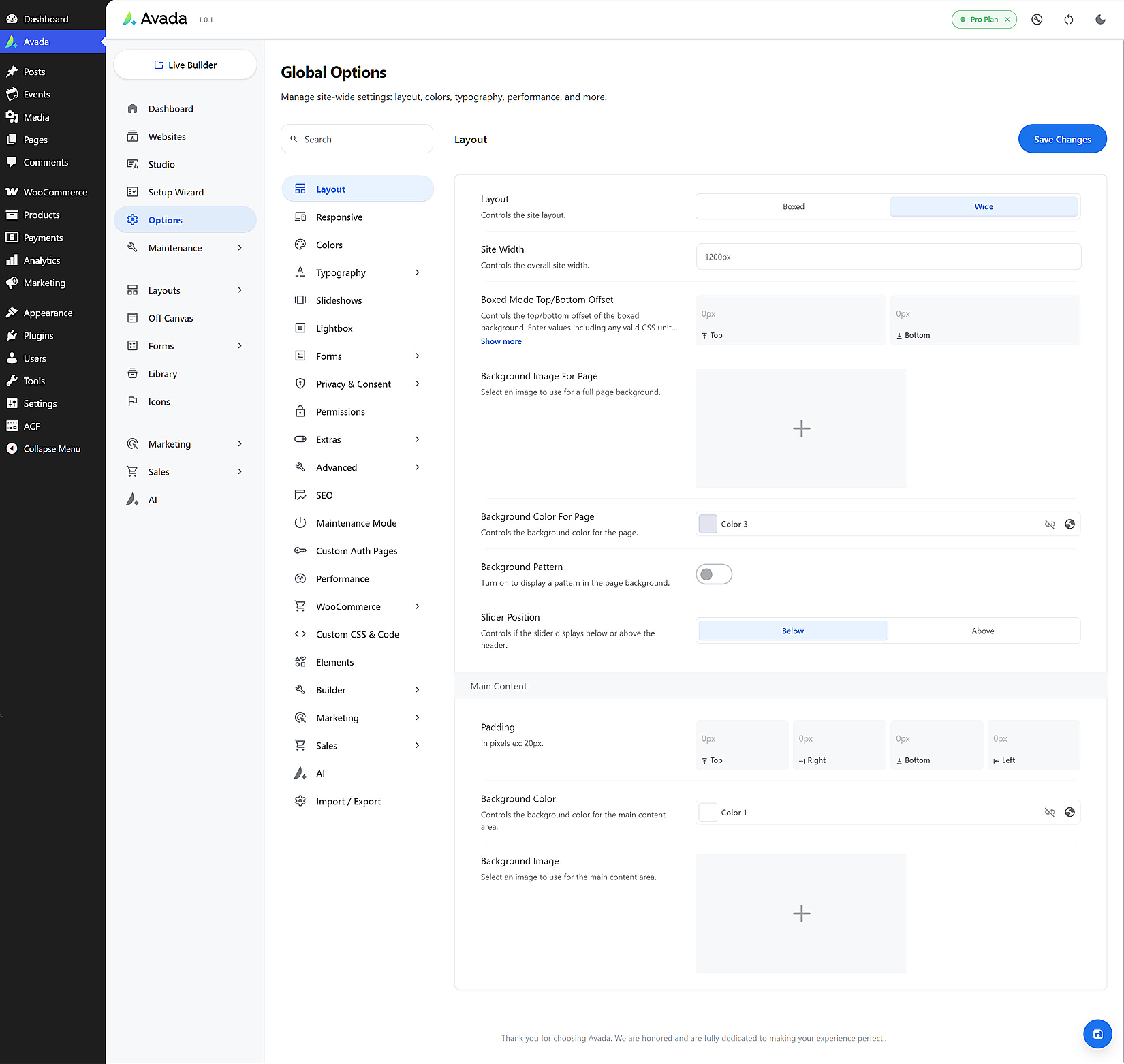
The Global Options Layout section at Avada > Options > Layout, makes it easy for you to manage your site’s layout type, width, padding and sidebar layouts. Choose between Boxed and Wide layouts, set page content padding, 100% width pages’ left and right padding, and adjust the top and bottom margins for all column sizes and single and dual sidebar layouts.
Layout – Choose between Boxed or Wide for your site. The Boxed option will restrict your site’s width to the value set in the site width option, using any valid CSS unit for example: 1280px – In the boxed mode, it is possible to set a background image, background pattern or a background color for your site. The Wide option will display your site at the width set in the site width option, using any valid CSS unit for example: 1170px or 100% width of the browser window.
Site Width – This option allows you to set the overall site width in the boxed or wide layout. You can use a pixel value (px), or a percentage (%). If you’d like your site to span the full browser width enter 100% as a value. If you’d prefer a set size, you can enter something like 1280px.
Boxed Mode Top/Bottom Offset – Controls the top/bottom offset of the boxed background. Enter values including any valid CSS unit, ex: 0px, 0px. This is a dependent option that always stays visible because other options can utilize it.
Boxed Mode Offset Scroll Mode – (Only if Boxed is selected) Choose how the page will scroll. Framed scrolling will keep the offset in place, while Full scrolling removes the offset when scrolling the page.
Boxed Mode Shadow Type – Controls the type of shadow your boxed mode displays.
Background Image For Page – Select an image to use for a full page background.

Background Color For Page – Controls the background color for the page.

Background Pattern – Turn on to display a pattern in the page background.
Slider Position – Controls if the slider displays below or above the header.
MAIN CONTENT
Padding – In pixels ex: 20px.
Background Color – Controls the background color for the main content area.
Background Image – Select an image to use for the main content area.